Turn it on
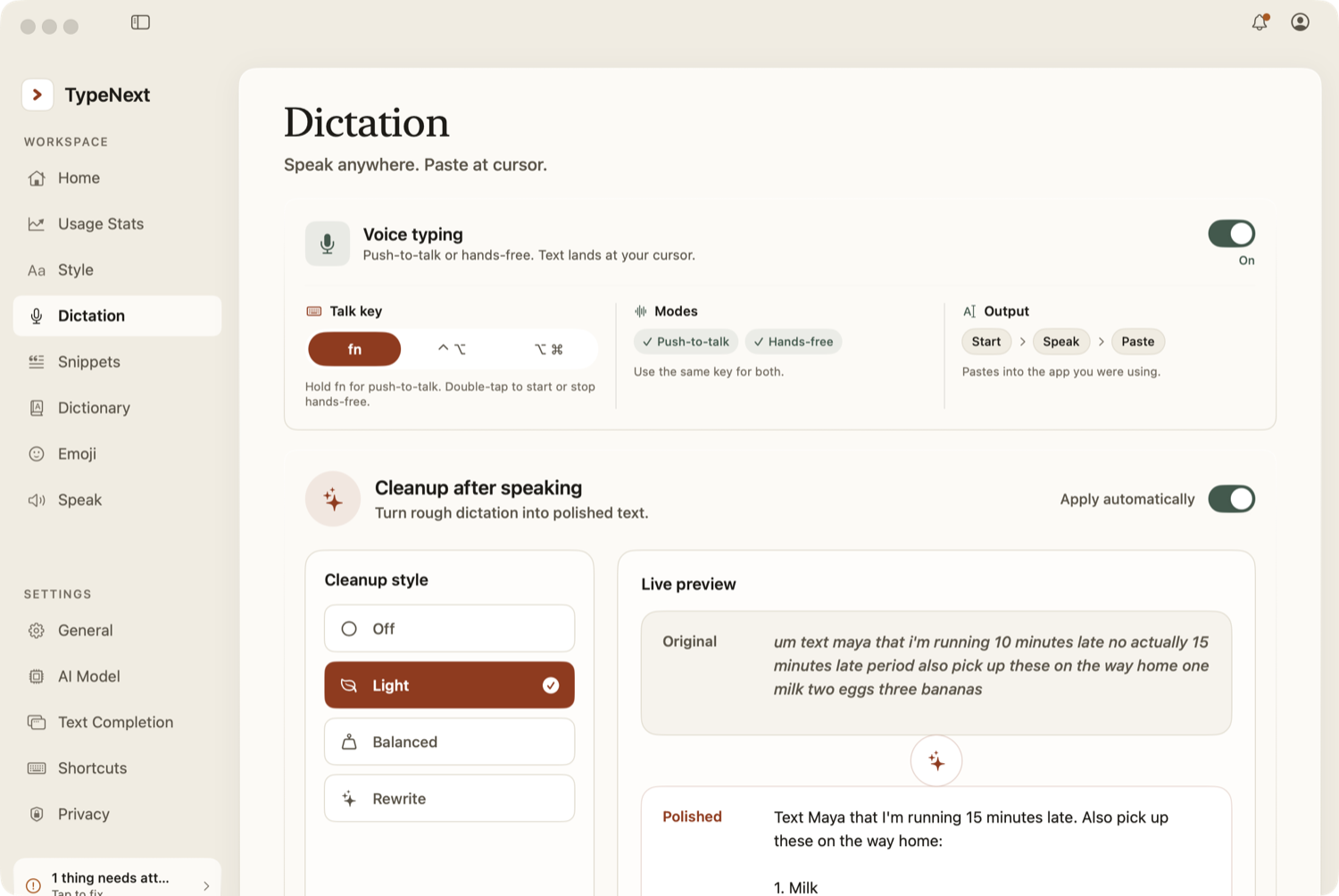
Dictation is off by default. Go to Settings → Dictation and enable it. Once on, you can start typing with your voice.
Push-to-talk mode
Hold the trigger key, speak, then release to insert the text at your cursor. The default trigger is fn (Globe key). You can change it to ⌃⌥ (Control-Option) or ⌥⌘ (Option-Command), held together, in Settings → Dictation.
Hands-free mode
Double-tap the trigger key to keep the mic on without holding it. Tap once to finish and insert the text. Hands-free stops automatically after about 6 seconds of silence, or 30 seconds maximum.
Recording interface
While recording, a small bar appears showing a live waveform with Cancel and Confirm buttons.
The voice bar — a small pill at the bottom of your screen whenever dictation is on — shows your status. Hover over it to expand it into a mic button (starts or stops hands-free) and a Fix button. Drag it by the handle at the top; it remembers where you put it.
Clean up your speech
Your raw speech is tidied to a level you choose, set in Settings → Dictation:
- Off — keep exactly what you said, stumbles and all.
- Light — drop fillers, fix self-corrections, tidy punctuation and lists.
- Balanced (the default) — clean it up and lightly tighten the wording.
- Rewrite — rewrite for brevity and polish.
With Apply automatically on (the default), cleanup runs after every dictation. Use the Fix button to clean the last thing you dictated on demand, or select any text and tap Fix to clean that instead.
Transcription routing
TypeNext chooses the transcription route automatically. It can use on-device speech when available, a local voice model when ready, or TypeNext cloud when that is the best available route.
- On-device or local — audio stays on your Mac.
- Cloud — audio goes through your TypeNext account to a supported AI provider within your plan limits.
Developer model settings can force local or cloud routing for testing; normal users do not need to choose a provider.
Language settings
Dictation auto-detects your language by default. To lock a specific language, enter its two-letter code (for example en, es, fr) in Settings → Dictation.
Names you add to the Dictionary can be used as hints for transcription, including cloud transcription when TypeNext routes there, so they are spelled correctly.